| No |
名称 |
Explanation |
Note |
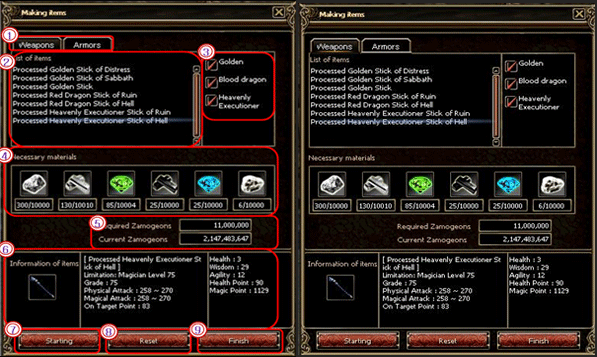
| 1 |
Kind of Item |
You can select the kind of item you want to make.
There are weapon and armors, and others can be added
|
|
| 2 |
Available Item List |
You can see the available item list |
|
| 3 |
Option |
Select window for option of items
You can choose more details here and decide manufacture grade for now.
|
|
| 4 |
Necessary materials |
It shows which materials are necessary to make your item.
It is marked in red if you don鈥檛 have enough materials.
|
|
| 5 |
Required Zamogeons |
Some Zamogeons are required for mixing items
The costs depend on the item grade you want.
|
|
| 6 |
Item information |
You can see the information of item to make. |
|
| 7 |
Start |
If you meet the all conditions for making items,
start button is activated.
|
|
| 8 |
Reset |
All information of item is removed. |
|
| 9 |
Finish |
Pop-up page for making items is closed. |
|